Endless Bridge Runner Adventure
Reviews
Endless Bridge Runner Adventure offers straightforward gameplay with a satisfying difficulty curve. The clean visuals and responsive controls make it easy to pick up. The gradual speed increase keeps you engaged without being overwhelming. Collecting coins adds a nice scoring element. Perfect for quick gaming sessions.
Description
Game Introduction
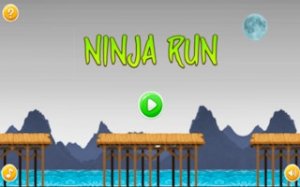
Endless Bridge Runner Adventure is an arcade game that places you in the role of a nimble character crossing a series of wooden bridges suspended high above the ground. The core objective is to run as far as possible while avoiding obstacles and collecting coins along the way. Each run is unique, with unpredictable bridge segments and hazards that require quick reactions. The game is designed to be easy to start, making it accessible for players of all ages. As you progress, the speed gradually increases, providing a satisfying challenge that tests your timing and focus. The clean visuals and smooth performance ensure an enjoyable experience on various devices. This game offers simple, fast-paced gameplay that is both accessible and rewarding, encouraging players to improve their performance with each attempt.
How to Play
Players control the character by tapping or clicking the screen to make them jump between bridge segments. Timing each jump carefully is essential to land safely on the next platform. You must also avoid obstacles that block your path. Coins can be collected for a higher score, but the primary focus should be on safe landings. Your run ends if you miss a jump or hit an obstacle. As you progress, the game gets faster, requiring you to find a rhythm and stay focused.
Game Features
One-tap controls make the game easy to pick up and play. Endless levels provide continuous challenges, with no two runs being exactly the same. Progressive difficulty keeps the gameplay exciting as your reflexes are tested. Collectible coins add a scoring element, encouraging you to improve your performance. Clean visuals and smooth performance ensure a pleasant experience on various devices.
Tips for Success
To succeed in Endless Bridge Runner Adventure, practice timing your jumps precisely. Start by focusing on safe landings rather than collecting every coin. As the speed increases, try to establish a steady rhythm to avoid mistakes. Pay attention to upcoming obstacles and plan your jumps accordingly. Regular practice will help you improve your reflexes and achieve higher scores.


Comments
0 comments