Cucumber Quest: Cooperative Puzzle
Reviews
Cucumber Quest stands out for its single-input control of two characters, a constraint that turns every level into a coordination exercise. The gradual difficulty curve and three-star rating system give players a reason to revisit stages and refine their routes. Its bright visuals and browser accessibility suit families and casual puzzle fans, though players seeking fast action may find the pace deliberate.
Description
One Input, Two Characters
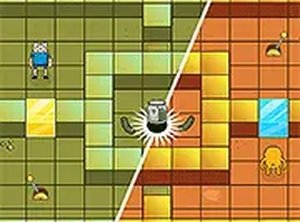
Cucumber Quest builds its puzzles around a single control scheme: one input moves both characters in the same direction. That constraint turns every step into a shared decision. You cannot move one character independently, so a path that helps one may push the other into a wall or away from a collectible. The challenge is finding routes that work for both at once.
Reading the Level Before You Move
Each stage presents a fresh arrangement of obstacles and items. Some levels use tight corridors that demand precise timing, while open areas allow more flexible pathfinding. The game encourages you to study the layout before acting, because a wrong move affects both characters. Difficulty rises gradually, so the coordination skill you build early carries into later stages.
Bright, Cartoon-Style Presentation
The visual design uses clear shapes and a cheerful color palette. Characters and obstacles are easy to distinguish on screen, which matters when you are tracking two positions at once. The lighthearted look keeps the tone approachable for players of any age without making the puzzles feel trivial.
Stars, Replays, and Steady Improvement
A three-star rating system rewards efficient play. Earning a perfect score means collecting every item along the most direct route, so completed levels remain worth revisiting. This adds depth without new mechanics. Over time, you can see your planning improve as you find tighter solutions.
Playing on Desktop or Mobile
Cucumber Quest runs in desktop and mobile browsers. Keyboard controls serve computer users, while touch controls handle tablets and phones. The simple input scheme means you can start solving immediately, with no lengthy tutorial standing between you and the first puzzle.
Compatibility
Faq
Do I need to control each character separately in Cucumber Quest?
Is Cucumber Quest playable on a phone or tablet?
What does the three-star rating system require?
Does the difficulty increase as I progress?
Is Cucumber Quest suitable for younger players?
Do I need to download anything to play Cucumber Quest?
Related Picks

Wreckage Navigator Puzzle

Meera Quest: Anime Platformer Journey

Medieval Village Builder Idle
Roo Journey 2: Sci-Fi Platformer

Ninja Platformer Adventure Arcade

Hexa Path Arcade Challenge

Grid Logic Puzzle Game

Kingdom Merge: Tower Defense Strategy

One Level Tower: Magical Puzzle Quest

Editorial Notes