Fashion Workshop for Young Designers
Reviews
Fashion Workshop for Young Designers does one thing clearly: it lets children combine tops, skirts, dresses, and accessories on a neutral character with single-click swaps. The lack of a built-in save feature means sharing depends on the device's screenshot tool, which may require adult help. Its strength is accessibility—no download, no cost, and a full-screen mode that reduces distractions. Best suited for younger children and families looking for a calm, creative browser activity.
Description
Choosing a Canvas
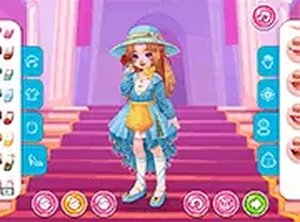
Fashion Workshop for Young Designers opens with a character selection screen. Each available character acts as a neutral base, so the starting point never locks a child into a particular style. The choice is quick, and the game moves directly into the dressing area without menus or setup steps. Because the character is only a canvas, the creative work happens entirely through the clothing and accessory choices that follow.
Mixing Pieces with Instant Feedback
The wardrobe includes tops, skirts, dresses, and decorative items such as bows and headpieces. Clicking any item applies it to the character immediately, so children see how a piece changes the overall look before committing to it. That instant response encourages experimentation: a skirt can be swapped for a dress in one click, and a bow can be added or removed just as easily. The design process stays visual rather than text-heavy, which suits younger players who may not read fluently yet.
Simple Controls and Full-Screen Focus
Every clothing swap requires only a single click. There are no drag-and-drop gestures, no confirmation dialogs, and no inventory management. A full-screen mode is available to hide browser distractions and keep attention on the outfit. This low-friction interface means children can iterate on a look as many times as they want without frustration, and parents do not need to supervise complex controls.
Saving and Sharing the Final Look
When an outfit is complete, players capture it using their device's built-in screenshot function. The image can then be uploaded to a personal profile so friends and family can see the result. This sharing step adds a social layer to what is otherwise a solo activity, and it gives the design session a clear endpoint. Because the game runs entirely in a web browser, it works on mobile devices and desktop computers without any download or installation. The free-to-play model removes any financial barrier to entry.










Editorial Notes