Line Runner Jump Challenge Arcade
Developer: Vintage Rift Labs
Published: 1753459200
Updated: 2026-09-30
Reviews
Line Runner Jump Challenge Arcade succeeds because it does one thing well: it makes jump timing the entire skill ceiling. The automatic running removes distraction, leaving you to judge hold duration and lane position. The AI opponent is a smart addition—it gives each race stakes without requiring multiplayer. Short sessions suit mobile play, and cross-platform controls work identically. The limitation is variety; the core loop rarely changes. Players who enjoy pure reflex challenges will get the most from it.
Description
Race Against an Adaptive AI
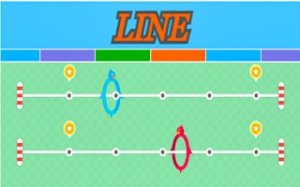
In Line Runner Jump Challenge Arcade, you are never running alone. An AI opponent races alongside you on a parallel track, reacting to your mistakes in real time. If you mistime a jump and stumble, the AI gains ground. This creates a constant sense of pressure that is easy to understand but difficult to master. Each race is short, so you can retry immediately after a loss and apply what you learned.Jump Timing and Lane Discipline
The core mechanic is simple: your character runs forward automatically, and you jump over white stripes by tapping the screen or pressing a key. The longer you hold the input, the higher and farther your character jumps. Hold too briefly, and you clip the stripe. Hold too long, and you overshoot the lane entirely. Staying within your assigned lane is just as important as clearing obstacles. This dual demand—timing and positioning—is what separates a clean run from a failed one.Controls Across Devices
On a computer, you can jump using the left mouse button or any keyboard key. On mobile, a single tap performs the same action. The input method is intentionally minimal so that your full attention stays on the track ahead. There are no complex combos or secondary buttons to manage. This cross-platform consistency means you can switch between PC and phone without relearning the controls.Short Sessions, Repeatable Challenge
Each race lasts only a short time, making the game suitable for quick breaks. The physics-based jump system gives every input a responsive feel, so mistakes feel like your own rather than the game's fault. The AI opponent provides a consistent challenge that scales with your performance without becoming unfair. Because races are brief, the game encourages repeated attempts and gradual improvement rather than long, exhausting sessions.Compatibility
• OS: Windows 10+, macOS 11+, iOS 14+, Android 10+
• Browsers: Chrome 100+, Safari 15+, Edge 100+, Firefox 100+
• Not compatible with Internet Explorer
Tested on real devices ✅ works as expected
Faq
Is Line Runner Jump Challenge Arcade free to play?
The input describes it as a hyper-casual online arcade game, a category that typically offers free browser-based play. However, the provided material does not specify pricing or monetization details. Check the platform where you access the game for current information on cost and any optional purchases.
Can I play Line Runner Jump Challenge Arcade on both PC and mobile?
Yes. The game supports cross-platform play. On a computer, you jump with the left mouse button or any keyboard key. On a mobile device, you tap the screen. The controls are identical in function, so your timing skills transfer directly between devices.
How does the AI opponent behave in Line Runner Jump Challenge Arcade?
The AI races alongside you and reacts to your mistakes. If you mistime a jump or fall out of your lane, the AI takes advantage of that error. It provides a consistent challenge without being unfair, meaning it punishes clear mistakes but does not cheat or move at impossible speeds.
What happens if I hold the jump input too long?
Holding the input longer increases both jump height and distance. If you hold too long, your character overshoots and may fall out of the assigned lane. This ends your run or costs you valuable time. Practicing different hold durations helps you learn the correct input for each stripe.
Is Line Runner Jump Challenge Arcade suitable for children?
The game is described as suitable for players of all ages. It features simple tap or click controls, no graphic content, and a friendly competition format. The challenge comes from timing and focus rather than any mature themes, making it appropriate for younger players who enjoy light arcade challenges.
How can I improve my jump timing in Line Runner Jump Challenge Arcade?
Practice holding the tap or click for different durations to build muscle memory. Stay calm and avoid rushing, since panic leads to mistimed jumps. Watch the AI opponent's movements to anticipate the track layout. Short, regular practice sessions improve reflexes and consistency more effectively than long, frustrated attempts.
Related Picks

Wreckage Navigator Puzzle

Monkey Frenzy 60 Second Arcade

Chicken Chase Farm Derby

Jetpack Jumpers: Online Arcade Adventure

Spring Jump Physics Platformer

Fruit Slice Dash - Endless Arcade Game

Shadow Runner: Arcade Action

Grandma Dash Japan Runner

Skateboard Dash: Arcade Runner

Editorial Notes