School Lot Parking Simulator
Reviews
School Lot Parking Simulator targets players who enjoy deliberate, skill-based driving challenges rather than racing. Its strength lies in the gradual shift from open lots to crowded spaces, which teaches spatial judgment without overwhelming newcomers. The timer and visual feedback support self-improvement, while offline play makes short sessions practical. The main limitation is narrow scope: it is purely about parking precision, so those seeking variety or action may find it repetitive.
Description
Core Parking Mechanics
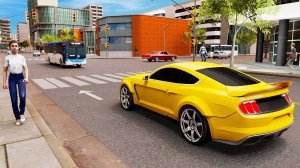
The central task in School Lot Parking Simulator is moving a vehicle into a spot outlined by yellow lines. Players steer, accelerate, and reverse using either on-screen buttons or tilt controls. The game rewards gentle, deliberate inputs: a slight misjudgment of distance or angle can result in a collision with cones, walls, or parked cars. Spatial awareness matters more than speed, and each attempt provides immediate visual feedback plus a timer for self-assessment.
Progression and Lot Design
Early stages take place in open lots with generous space, giving newcomers room to learn how the car responds. Later scenarios shrink the available area and add more obstacles, forcing players to plan each move before committing. The game rotates through angle, perpendicular, and parallel parking methods, so no two stages feel identical. This structure builds on skills gradually rather than introducing new mechanics all at once.
Campus Setting and Visual Clarity
The school campus backdrop includes buildings, walkways, and outdoor areas that frame each parking challenge. This familiar setting keeps the scenarios grounded and easy to read. The 3D graphics provide depth cues that help players judge the vehicle's position relative to curbs, cones, and other vehicles, which is essential when clearance is tight.
Offline Practice and Skill Growth
All features work without an internet connection, so practice sessions are not interrupted by connectivity issues. The combination of a timer, visual feedback, and gentle control requirements encourages patience over rushing. Over time, players can develop better hand-eye coordination and a stronger sense of vehicle dimensions, making even crowded lots feel manageable.







Editorial Notes